Not: Kimi durumda Türkçe karşılıkları tam olarak anlamı karşılamamaktadır.
Some of the code samples generated by chatbot.
Why OOP?
- Maintenance
- Maintenance Cost
- Extensibility
- Reusability
What is Class and Object?
- Class Structure:
- A class is the fundamental structure in object-oriented programming.
- Data and methods are defined together within a class.
- A class serves as a blueprint, specifying how an object will be created.
- Object:
- Instances derived from a class.
- Objects are tangible entities carrying the properties and behaviors of a specific class.
- It represents an example of a class and embodies real-world entities.
- Differences Between Class and Object:
- Class is an abstract structure, not directly usable; object is a concrete concept.
- Class is a blueprint; object is an instance created based on that blueprint.
- Attributes:
- Variables or properties defined within a class.
- For instance, in a “Car” class, attributes could include “color” and “model.”
- Methods:
- Functions defined within a class.
- Used to perform various actions on an object.
- For example, a “Car” class might have methods like “move” or “stop.”
- Instance:
- An object derived from a class.
- A tangible entity carrying the properties and behaviors of a specific class.
- For instance, an object derived from the “Car” class represents a specific car.
- Examples of Attributes:
- In a “Car” class, attributes like color, model, and speed might exist.
- In a “Student” class, attributes like name, ID, and class could be present.
public class Car {
    // Attributes
    private String color;
    private String model;
    private int speed;

    // Constructor
    public Car(String color, String model, int speed) {
        this.color = color;
        this.model = model;
        this.speed = speed;
    }

    // Methods
    public void accelerate() {
        speed += 10;
    }

    public void brake() {
        speed -= 5;
    }

    public void displayInfo() {
        System.out.println("Car Info - Color: " + color + ", Model: " + model + ", Speed: " + speed);
    }

    public static void main(String[] args) {
        Car myCar = new Car("Red", "Sedan", 0);
        myCar.accelerate();
        myCar.displayInfo();
    }
}
#include <iostream>
using namespace std;

class Car {
private:
    string color;
    string model;
    int speed;

public:
    Car(string color, string model, int speed) {
        this->color = color;
        this->model = model;
        this->speed = speed;
    }

    void accelerate() {
        speed += 10;
    }

    void brake() {
        speed -= 5;
    }

    void displayInfo() {
        cout << "Car Info - Color: " << color << ", Model: " << model << ", Speed: " << speed << endl;
    }
};

int main() {
    Car myCar("Blue", "SUV", 0);
    myCar.accelerate();
    myCar.displayInfo();
    return 0;
}
class Car:
    def __init__(self, color, model, speed):
        self.color = color
        self.model = model
        self.speed = speed

    def accelerate(self):
        self.speed += 10

    def brake(self):
        self.speed -= 5

    def display_info(self):
        print(f"Car Info - Color: {self.color}, Model: {self.model}, Speed: {self.speed}")

# Example
my_car = Car("Green", "Hatchback", 0)
my_car.accelerate()
my_car.display_info()
class Car(var color: String, var model: String, var speed: Int) {
    fun accelerate() {
        speed += 10
    }

    fun brake() {
        speed -= 5
    }

    fun displayInfo() {
        println("Car Info - Color: $color, Model: $model, Speed: $speed")
    }
}

fun main() {
    val myCar = Car("Yellow", "Convertible", 0)
    myCar.accelerate()
    myCar.displayInfo()
}
What are Access Modifiers?
Access modifiers are keywords that set the accessibility of classes, methods, and other members.
- Public: Accessible from anywhere.
- Private: Accessible only from within the class.
- Protected: Accessible from within the class and subclasses.
- Internal: Accessible from within the same module.
- Protected Internal: Accessible from within the same module and subclasses.
- Private Protected: Accessible from within the same class or subclasses in the same module.
What is Constructor?
- A constructor is a special method that is called when an object is created.
- It is used to initialize the object’s state.
- It has the same name as the class.
- It does not have a return type.
- Can be overloaded.
- Can be empty or have parameters.
- Access modifiers are used when defining constructors.
public class Car {
    private String color;
    private String model;
    private int speed;

    // Constructor
    public Car(String color, String model, int speed) {
        this.color = color;
        this.model = model;
        this.speed = speed;
    }

    // Constructor Overloading (Empty Constructor)
    // @NoArgsContructor annotation can be used in Spring Boot
    public Car() {
        this.color = "Black";
        this.model = "Sedan";
        this.speed = 0;
    }


    // Constructor Overloading
    public Car(String color, String model) {
        this.color = color;
        this.model = model;
        this.speed = 0;
    }

    public void displayInfo() {
        System.out.println("Car Info - Color: " + color + ", Model: " + model + ", Speed: " + speed);
    }

    public static void main(String[] args) {
        Car myCar = new Car("Red", "Sedan", 0);
        myCar.displayInfo();
    }
}
What is Destructor?
- A destructor is a special method that is called when an object is destroyed.
- It is used to perform cleanup tasks.
- It has the same name as the class preceded by a tilde (~).
- It does not have a return type.
- Cannot be overloaded.
- Cannot have parameters.
- Access modifiers are not used when defining destructors.
- ex. to free memory allocated by the object.
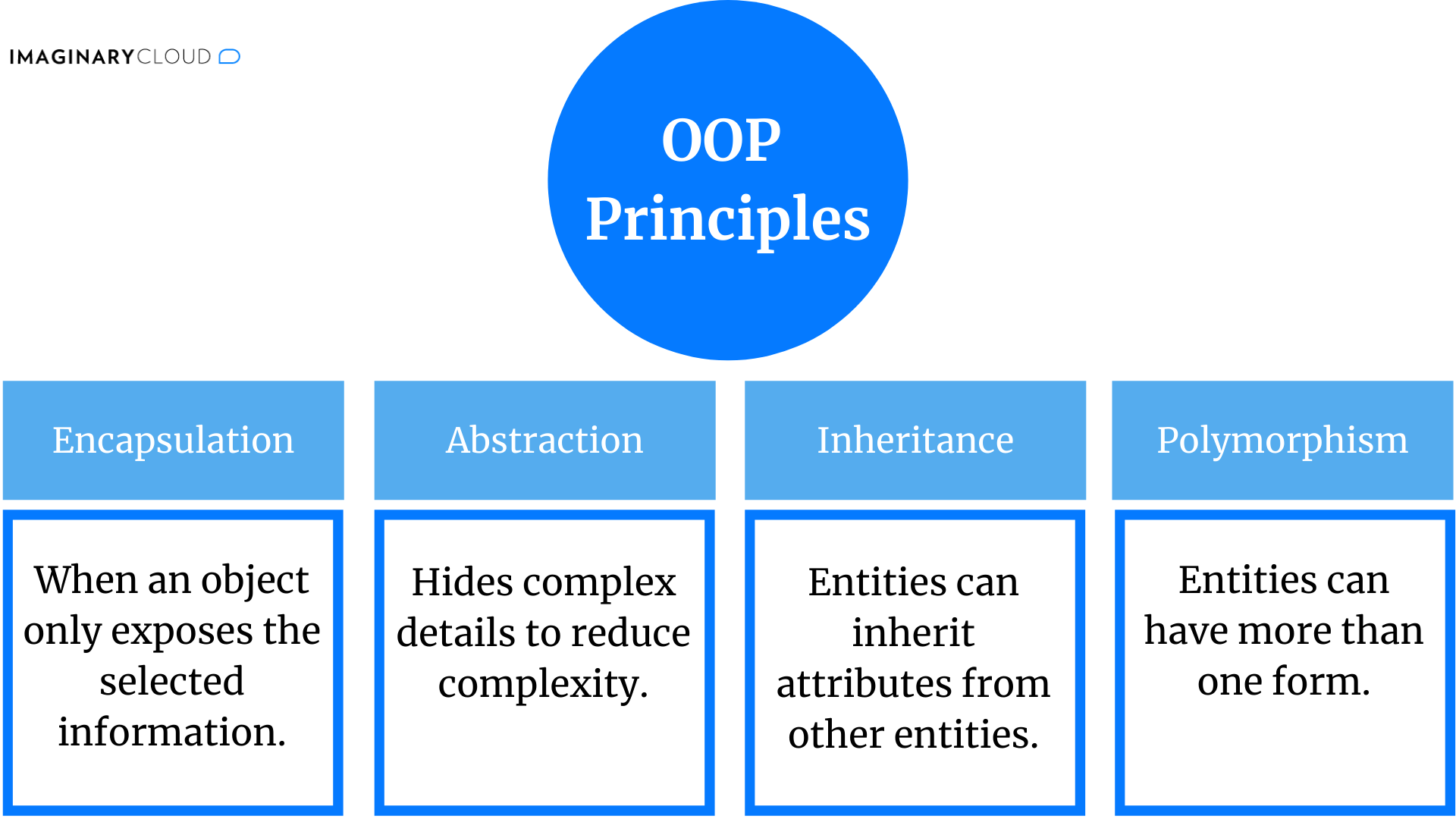
What are OOP Principles?
- Abstraction
- Encapsulation
- Polymorphism
- Inheritance
What is Abstraction?
- Abstraction is the process of hiding the internal details and showing only the functionality.
- Abstraction lets you focus on what the object does instead of how it does it., i.e., the implementation details are hidden from the user.
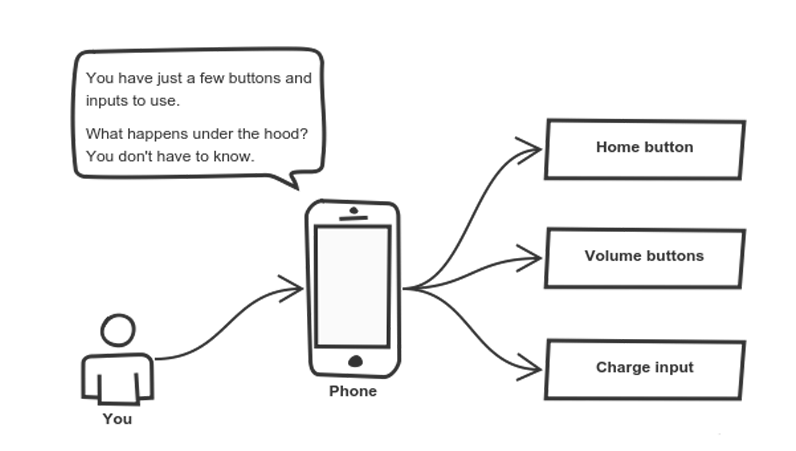
- Example: You interact with your phone by using only a few buttons. What’s going on under the hood? You don’t have to know — implementation details are hidden. You only need to know a short set of actions.
What is Encapsulation?
- Encapsulation is the process of wrapping data and methods into a single unit.
- It is used to hide the internal details of an object from the outside world.
- We are able to access the data only through the methods defined in the class.
- Thanks to access modifiers, we can control the visibility of the data and methods.
public class Book {
    private String title;
    private String author;
    private int year;

    public Book(String title, String author, int year) {
        this.title = title;
        this.author = author;
        this.year = year;
    }

    // Getter and setter methods for encapsulation
    public String getTitle() {
        return title;
    }

    public void setTitle(String title) {
        this.title = title;
    }

    public String getAuthor() {
        return author;
    }

    public void setAuthor(String author) {
        this.author = author;
    }

    public int getYear() {
        return year;
    }

    public void setYear(int year) {
        this.year = year;
    }
}
The
Bookclass encapsulates the details of abook, such astitle,author, andyear. The attributes (title,author, andyear) are marked as private, meaning they can only be accessed within the Book class. This is an example of encapsulation, as the internal representation is hidden from outside classes. Public getter and setter methods are provided to access and modify the private attributes. This allows controlled access to the internal state of the Book object.
What is Inheritence?
- Inheritance is the process of creating a new class from an existing class.
- The new class is called the derived class or child class.
- The existing class is called the base class or parent class.
- The derived class inherits the properties and methods of the base class.
- The derived class can add new properties and methods.
- The derived class can override the properties and methods of the base class.
- In Java, a class can only (extends) inherit from one class.
public class Animal {
    private String name;
    private int age;

    public Animal(String name, int age) {
        this.name = name;
        this.age = age;
    }

    public void eat() {
        System.out.println("Animal is eating...");
    }

    public void sleep() {
        System.out.println("Animal is sleeping...");
    }
}

public class Dog extends Animal {
    private String breed;

    public Dog(String name, int age, String breed) {
        super(name, age);
        this.breed = breed;
    }

    public void bark() {
        System.out.println("Dog is barking...");
    }

    @Override
    public void eat() {
        System.out.println("Dog is eating...");
    }
}
The
Dogclass inherits the properties and methods of theAnimalclass. TheDogclass adds a new property calledbreed. TheDogclass can access theeat()andsleep()methods of theAnimalclass. TheDogclass can access thenameandageproperties of theAnimalclass. TheDogclass can access thebreedproperty. TheDogclass can access thebark()method on its own. TheDogclass can access theeat()method of theAnimalclass, but it will call theeat()method of theDogclass because it overrides theeat()method of theAnimalclass.
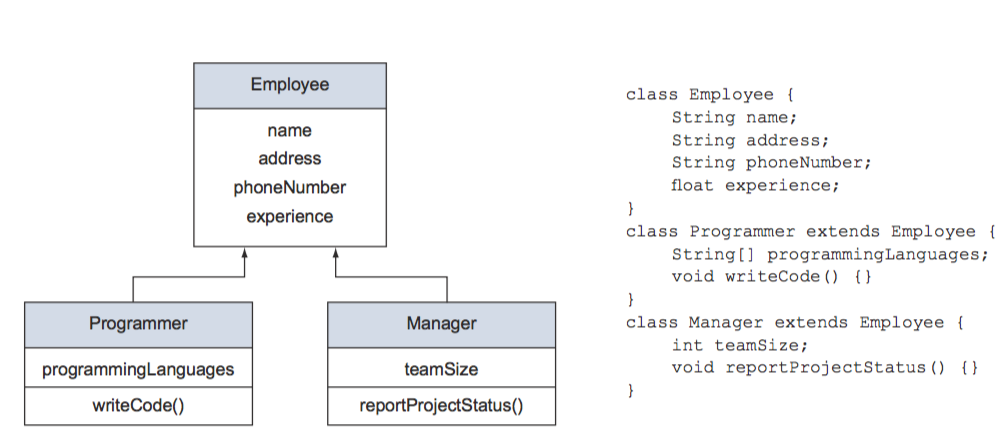
- Another exapmle: Imagine the positions Programmer and Manager within an organization. Both of these positions have a common set of properties, including name, address, and phone num- ber. These positions also have different properties. A Programmer may be concerned with a project’s programming languages, whereas a Manager may be concerned with project status reports.:
 Source: GitBook
What is Polymorphism in General?
- Polymorphism is the ability of an object to take on many forms.
- It is the ability to redefine methods for derived classes.
- It is the ability to provide a single interface to entities of different types.
What are the Types of Polymorphism?
- Compile-time Polymorphism:
- Also known as static polymorphism or early binding.
- The compiler determines which method to call at compile time.
- Method overloading is an example of compile-time polymorphism.
- The compiler determines which overloaded method to call based on the number and type of arguments passed to the method.
- Run-time Polymorphism:
- Also known as dynamic polymorphism or late binding.
- The compiler determines which method to call at run time.
- Method overriding is an example of run-time polymorphism.
- The compiler determines which overridden method to call based on the type of the object.
What is Method Overloading?
- Method overloading is a feature that allows a class to have more than one method with the same name.
- The methods must have different types or numbers of parameters.
- The methods may have different return types.
- The methods may have different access modifiers.
- The methods may throw different exceptions.
- The methods may have different method bodies.
// Method Overloading
class Demo {
    void show(int a) {
        System.out.println("Method with one parameter: " + a);
    }

    void show(int a, int b) {
        System.out.println("Method with two parameters: " + a + ", " + b);
    }
}

public class Main {
    public static void main(String[] args) {
        Demo obj = new Demo();
        obj.show(1);       // Calls the method with one parameter
        obj.show(1, 2);    // Calls the method with two parameters
    }
}
What is Method Overriding?
- Method overriding is a feature that allows a subclass to provide a specific implementation of a method that is already provided by its superclass.
- The method in the subclass has the same name, same parameters or signature, and same return type as the method in the superclass.
- The method in the subclass must be at least as accessible or more accessible than the method in the superclass.
// Method Overriding
class Parent {
    void show() {
        System.out.println("Parent's show()");
    }
}

class Child extends Parent {
    // This method overrides the show() of Parent
    @Override
    void show() {
        System.out.println("Child's show()");
    }
}

public class Main {
    public static void main(String[] args) {
        Parent obj1 = new Parent();
        obj1.show();      // Calls the show() of Parent

        Parent obj2 = new Child();
        obj2.show();      // Calls the show() of Child
    }
}
What is the Difference Between Method Overloading and Method Overriding?
| Method Overloading | Method Overriding |
|---|---|
| Method overloading is a feature that allows a class to have more than one method with the same name. | Method overriding is a feature that allows a subclass to provide a specific implementation of a method that is already provided by its superclass. |
| The methods must have different types or numbers of parameters. | The method in the subclass has the same name, same parameters or signature, and same return type as the method in the superclass. |
| The methods may have different return types. | The method in the subclass must be at least as accessible or more accessible than the method in the superclass. |
| The methods may have different access modifiers. | The methods have same access modifiers. |
| Overloaded methods are in the same class or class hierarchy but have different method signatures. | Overriding methods are present in a superclass and a subclass, where the subclass provides a specific implementation. |
| Method names must be the same. | Method names must be the same. |
| Method signatures must be different. | Method signatures must be the same. |
| Method overloading is an example of compile-time polymorphism. | Method overriding is an example of run-time polymorphism. |
Simple Coding Question 1
Take an input from the keyboard in Java, and write a function to determine whether this input is the sum of the squares of any two other numbers. Provide the Java code and explain the solution.
public class SumOfSquares {

    // Function to check if a number is the sum of squares of two other numbers
    static boolean isSumOfSquares(int num) {
        // Iterate through possible values of a and b
        for (int a = 0; a <= Math.sqrt(num); a++) {
            int b = (int) Math.sqrt(num - a * a);

            // Check if a^2 + b^2 equals the given number
            if (a * a + b * b == num) {
                return true;
            }
        }
        return false;
    }

    public static void main(String[] args) {
        // Example usage
        int inputNumber = 5;
        if (isSumOfSquares(inputNumber)) {
            System.out.println(inputNumber + " is the sum of squares of two numbers.");
        } else {
            System.out.println(inputNumber + " is NOT the sum of squares of two numbers.");
        }
    }
}
Explanation
isSumOfSquares Function:
- Takes an integer as input and iterates through possible values of two numbers (
aandb) to check if their squares sum up to the given number. - The iteration for
agoes from 0 to the square root of the given number because any larger value forawould result in a negative or complex value forb. - Inside the loop,
bis calculated as the square root of(num - a * a). - The function checks if
a^2 + b^2equals the given number. If true, it returnstrueindicating that the number is the sum of squares of two other numbers; otherwise, it returnsfalse.
Example Usage (main method):
- An example usage is provided where the
isSumOfSquaresfunction is called with an input number (in this case, 5). - The result is printed to the console, indicating whether the input number is the sum of squares of two other numbers or not.
Example Output:
5 is NOT the sum of squares of two numbers.
13 is the sum of squares of two numbers.
What is UML?
- UML stands for Unified Modeling Language.
- It is a standardized modeling language for object-oriented software engineering.
- It is used to visualize, specify, construct, and document the artifacts of a software system.
- It is used to model business and similar processes.
- Different visibility of the class can be represented as
- + Public
- - Private
- # Protected
Example UML Diagram:
class Circle {
private:
double radius;
Point center;
public:
setRadius(double radius);
setCenter(Point center);
double getArea();
double getCircumfrence();
};

Source: CppCodeTips
Simple Coding Question 2
Write a function that finds weather a given number is a palindrome or not. Provide the Java code and explain the solution.
Palindrome: A palindrome is a word, number, phrase, or other sequence of characters which reads the same backward as forward, such as madam, racecar.
public class Palindrome {

    // Function to check if a number is a palindrome
    static boolean isPalindrome(int num) {
        int reversedNum = 0;
        int originalNum = num;

        // Reverse the number
        while (num != 0) {
            int digit = num % 10;
            reversedNum = reversedNum * 10 + digit;
            num /= 10;
        }

        // Check if the reversed number is equal to the original number
        return originalNum == reversedNum;
    }

    public static void main(String[] args) {
        // Example usage
        int inputNumber = 12321;
        if (isPalindrome(inputNumber)) {
            System.out.println(inputNumber + " is a palindrome.");
        } else {
            System.out.println(inputNumber + " is NOT a palindrome.");
        }
    }
}
Explanation
isPalindrome Function:
- Takes an integer as input and reverses it.
- The reversed number is compared to the original number to check if they are equal.
- If they are equal, the function returns
trueindicating that the number is a palindrome; otherwise, it returnsfalse. - The function uses the
%operator to get the last digit of the number and the/operator to remove the last digit of the number. - The last digit is added to the reversed number by multiplying it by 10 and adding the digit.
- The last digit is removed from the original number by dividing it by 10.
- This process is repeated until the original number becomes 0.
Example Usage (main method):
- An example usage is provided where the
isPalindromefunction is called with an input number (in this case, 12321). - The result is printed to the console, indicating whether the input number is a palindrome or not.
Example Output:
12321 is a palindrome.
12345 is NOT a palindrome.
Simple Coding Question 3
Write a function that finds weather a given number is a prime number or not. Provide the Java code and explain the solution.
Prime Number: A prime number is a natural number greater than 1 that is not a product of two smaller natural numbers.
public class PrimeNumber {

    // Function to check if a number is a prime number
    static boolean isPrime(int num) {
        // Check if the number is less than 2
        if (num < 2) {
            return false;
        }

        // Check if the number is divisible by any number from 2 to its square root
        for (int i = 2; i <= Math.sqrt(num); i++) {
            if (num % i == 0) {
                return false;
            }
        }

        return true;
    }

    public static void main(String[] args) {
        // Example usage
        int inputNumber = 7;
        if (isPrime(inputNumber)) {
            System.out.println(inputNumber + " is a prime number.");
        } else {
            System.out.println(inputNumber + " is NOT a prime number.");
        }
    }
}
Explanation
isPrime Function:
- Takes an integer as input and checks if it is a prime number.
- The function first checks if the number is less than 2. If true, it returns
falseindicating that the number is not a prime number. - If the number is greater than or equal to 2, the function checks if the number is divisible by any number from 2 to its square root.
- If the number is divisible by any number from 2 to its square root, it returns
falseindicating that the number is not a prime number. - If the number is not divisible by any number from 2 to its square root, it returns
trueindicating that the number is a prime number. - The function uses the
%operator to check if the number is divisible by another number. - The function uses the
sqrtmethod of theMathclass to get the square root of the number. - The function uses a
forloop to iterate through possible values ofifrom 2 to the square root of the number. - The function returns
falseif the number is divisible byi; otherwise, it returnstrue. - The function returns
trueif the number is not divisible by any number from 2 to its square root. - The function returns
falseif the number is divisible by any number from 2 to its square root. - The function returns
falseif the number is less than 2.
Example Usage (main method):
- An example usage is provided where the
isPrimefunction is called with an input number (in this case, 7).
Example Output:
7 is a prime number.
12 is NOT a prime number.
Simple Coding Question 4
Write a function that finds the Greatest Common Divisor (GCD) of two numbers. Provide the Java code and explain the solution.
Greatest Common Divisor (GCD): The greatest common divisor (GCD) of two or more integers, which are not all zero, is the largest positive integer that divides each of the integers.
Note: Use recursion to solve this problem.
public class GCD {

    // Function to find the GCD of two numbers
    static int findGCD(int num1, int num2) {
        // Check if num2 is 0
        if (num2 == 0) {
            return num1;
        }

        // Recursively call the function with num2 as the first parameter and num1 % num2 as the second parameter
        return findGCD(num2, num1 % num2);
    }

    public static void main(String[] args) {
        // Example usage
        int num1 = 12;
        int num2 = 18;
        System.out.println("GCD of " + num1 + " and " + num2 + " is " + findGCD(num1, num2));
    }
}
Explanation
findGCD Function:
- Takes two integers as input and finds their GCD.
- The function first checks if the second number is 0. If true, it returns the first number indicating that the GCD is the first number.
- If the second number is not 0, the function recursively calls itself with the second number as the first parameter and the remainder of the first number divided by the second number as the second parameter.
- The function returns the result of the recursive call.
Example Usage (main method):
- An example usage is provided where the
findGCDfunction is called with two input numbers (in this case, 12 and 18). - The result is printed to the console, indicating the GCD of the two input numbers.
- The result is 6 because 6 is the largest positive integer that divides both 12 and 18.
Example Output:
GCD of 12 and 18 is 6
Simple Coding Question 5
Write a function that finds the Least Common Multiple (LCM) of two numbers. Provide the Java code and explain the solution.
Least Common Multiple (LCM): The least common multiple (LCM) of two integers a and b is the smallest positive integer that is divisible by both a and b.
public class LCMDemo {
    public static void main(String[] args) {
        int num1 = 15, num2 = 20;
        System.out.println("The LCM of " + num1 + " and " + num2 + " is " + lcm(num1, num2));
    }

    public static int lcm(int num1, int num2) {
        int max, step, lcm = 0;

        // Get the maximum number
        max = (num1 > num2) ? num1 : num2;

        // Initialize step with the maximum number
        step = max;

        // This loop will run until it finds an LCM
        while(true) {
            if(max % num1 == 0 && max % num2 == 0) {
                lcm = max;
                break;
            }
            max += step;
        }
        return lcm;
    }
}
Simple Coding Question 6
Write a function that finds the given number is an Armstrong number or not. Provide the Java code and explain the solution.
Armstrong Number: An Armstrong number is a number that is the sum of its own digits each raised to the power of the number of digits.
public class ArmstrongNumber {

    // Function to check if a number is an Armstrong number
    static boolean isArmstrongNumber(int num) {
        int originalNum = num;
        int sum = 0;

        // Calculate the sum of the digits raised to the power of the number of digits
        while (num != 0) {
            int digit = num % 10;
            sum += Math.pow(digit, String.valueOf(originalNum).length());
            num /= 10;
        }

        // Check if the sum is equal to the original number
        return originalNum == sum;
    }

    public static void main(String[] args) {
        // Example usage
        int inputNumber = 153;
        if (isArmstrongNumber(inputNumber)) {
            System.out.println(inputNumber + " is an Armstrong number.");
        } else {
            System.out.println(inputNumber + " is NOT an Armstrong number.");
        }
    }
}
Explanation
isArmstrongNumber Function:
- Takes an integer as input and checks if it is an Armstrong number.
- The function first stores the original number in a variable.
- The function then calculates the sum of the digits raised to the power of the number of digits.
- The function checks if the sum is equal to the original number.
- If the sum is equal to the original number, the function returns
trueindicating that the number is an Armstrong number; otherwise, it returnsfalse. - The function uses the
%operator to get the last digit of the number and the/operator to remove the last digit of the number. - The last digit is added to the sum by raising it to the power of the number of digits.
- The last digit is removed from the original number by dividing it by 10.
- This process is repeated until the original number becomes 0.
Example Usage (main method):
- An example usage is provided where the
isArmstrongNumberfunction is called with an input number (in this case, 153). - The result is printed to the console, indicating whether the input number is an Armstrong number or not.
Example Output:
153 is an Armstrong number.
123 is NOT an Armstrong number.
Simple Coding Question 7
Given five positive integers, find the minimum and maximum values that can be calculated by summing exactly four of the five integers. Then print the respective minimum and maximum values as a single line of two space-separated long integers.
Source: HackerRank
public class MinMaxSum {

    public static void main(String[] args) {
        // Example usage:
        int[] inputNumbers = {1, 3, 5, 7, 9};
        long[] result = findMinMaxSum(inputNumbers);

        // Print the respective minimum and maximum values as a single line
        System.out.println(result[0] + " " + result[1]);
    }

    public static long[] findMinMaxSum(int[] arr) {
        long minSum = Long.MAX_VALUE;
        long maxSum = Long.MIN_VALUE;
        long totalSum = 0;

        for (int num : arr) {
            totalSum += num;

            // Track the minimum and maximum elements
            minSum = Math.min(minSum, num);
            maxSum = Math.max(maxSum, num);
        }

        // Calculate the minimum and maximum sums
        long minTotal = totalSum - maxSum;
        long maxTotal = totalSum - minSum;

        return new long[]{minTotal, maxTotal};
    }
}
Explanation
- The minimum sum is 1 + 3 + 5 + 7 = 16 and the maximum sum is 3 + 5 + 7 + 9 = 24.
Example Output:
16 24
Simple Coding Question 8
Find second largest number in an array. Provide the Java code and explain the solution.
public class SecondLargestNumber {

    public static void main(String[] args) {
        // Example usage:
        int[] numbers = {5, 2, 9, 1, 7};
        int secondLargest = findSecondLargest(numbers);

        System.out.println("Second largest number: " + secondLargest);
    }

    public static int findSecondLargest(int[] arr) {
        if (arr.length < 2) {
            System.out.println("Array should have at least two elements.");
            return -1; // Return a special value indicating an error or not found
        }

        int largest = Integer.MIN_VALUE;
        int secondLargest = Integer.MIN_VALUE;

        for (int num : arr) {
            if (num > largest) {
                secondLargest = largest;
                largest = num;
            } else if (num > secondLargest && num != largest) {
                secondLargest = num;
            }
        }

        return secondLargest;
    }
}
Simple Coding Question 9
Two cats and a mouse are at various positions on a line. You will be given their starting positions. Your task is to determine which cat will reach the mouse first, assuming the mouse does not move and the cats travel at equal speed. If the cats arrive at the same time, the mouse will be allowed to move, and it will escape while they fight.
You are given a set of queries in the form of x, y, and z, representing the respective positions for cats A and B, and for mouse C. Complete the function
catAndMouseto return the appropriate answer to each query, which will be printed on a new line.
- If cat A catches the mouse first, print “Cat A.”
- If cat B catches the mouse first, print “Cat B.”
- If both cats reach the mouse at the same time, print “Mouse C” as the two cats fight, and the mouse escapes.
Example
int positionCatA = 2;
int positionCatB = 5;
int positionMouseC = 4;

System.out.println(catAndMouse(positionCatA, positionCatB, >positionMouseC));
// Output: Cat B
Queue vs. Stack
| Queue | Stack |
|---|---|
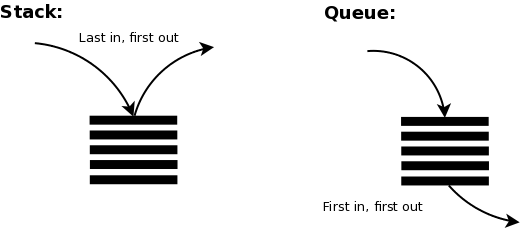
| First In First Out (FIFO) | Last In First Out (LIFO) |
| Elements are added to the back of the queue and removed from the front of the queue. | Elements are added to the top of the stack and removed from the top of the stack. |
| Example: Waiting in line | Example: Stack of plates |
| Example: Printer queue | Example: Undo/Redo operations |
What is a Linked List?
- A linked list is a data structure.
- It consists of a sequence of elements.
- Each element points to the next element in the sequence.
- Unlike arrays, linked lists do not have a fixed size.
- The elements in linked lists, called nodes, are not stored in contiguous memory locations.
- Each node contains data and a reference (or link) to the next node in the sequence.
- O(n) time complexity for search and O(1) time complexity for insertion and deletion.
For more information, see Linked List Example
Linked List vs. Linear Array
| Characteristics | Linear Array | Linked List |
|---|---|---|
| Deletion and Insertions are difficult. | Difficult | Can be done easily |
| For insertion and deletion, it needs movements | Requires movements | Does not require movement of nodes |
| Space is wasted | Wastes space | Space is not wasted |
| It is expensive | Expensive | Not expensive |
| Cannot be reduced or extended according to requirements | Fixed size | Can be reduced or extended as needed |
| Same amount of time required for each element | Same time required | Different time required for each element |
| Elements are stored in consecutive memory locations | Stored in consecutive memory locations | May or may not be stored consecutively |
| Direct access to a particular element | Direct access | Need to traverse nodes to reach the element |
Code First vs. Database First
| Code First | Database First |
|---|---|
| Code first approach is used when you have an existing database, but you don’t have an existing model. | Database first approach is used when you have an existing database and you want to create a model that maps to the database schema. |
| You can create a database from the model. | You can create a model from the database. |
Abstract Class vs. Interface
| Characteristics | Abstract Class | Interface |
|---|---|---|
| A class can inherit multiple interfaces | Limited to inheriting one abstract class | Multiple inheritance is supported |
| Can have both abstract and concrete methods | Can have both abstract and concrete methods | Limited to abstract and empty methods |
| Provides advantages in terms of speed | May be slower due to multiple method calls | May be faster due to single method call |
| Adding a new method requires implementation | Requires implementation for all implementing classes | Implementation is optional for existing classes |
| Supports multiple inheritance | Does not support multiple inheritance | Limited to single inheritance |
| Accessibility is not restricted to “public” | All elements must be “public” | All elements must be “public” |
| Can include constructor methods | May include constructor methods | Does not include constructor methods |
| Allows non-static and static methods | Does not allow static methods | Does not allow static methods |
For .NET Framework
.NET vs .NET Core
| .NET | .NET Core |
|---|---|
| .NET Framework is a software framework developed by Microsoft. | .NET Core is a free and open-source, managed computer software framework for Windows, Linux, and macOS operating systems. |
| .NET Framework comes with all the libraries and APIs required for developing applications. | .NET Core is a subset of .NET Framework. It does not include all the libraries and APIs. |
Value Type vs. Reference Type
| Value Type | Reference Type |
|---|---|
| Value types are stored in the stack. | Reference types are stored in the heap. |
| Value types are allocated memory at compile time. | Reference types are allocated memory at run time. |
| Value types are destroyed immediately after the scope is lost. | Reference types are destroyed by the garbage collector. |
| ex. int, float, double, char, bool, enum, struct | ex. class, interface, delegate, object, string, dynamic |
What is a Delegate?
- A delegate is a type that represents references to methods with a particular parameter list and return type.
What is a Generic?
- A generic is a type that is parameterized over other types.
- It is used to maximize code reuse, type safety, and performance.
- It is used to create classes, interfaces, and methods that have placeholders for one or more types.
// Generic class in Java
class Box<T> {
    private T content;

    public Box(T content) {
        this.content = content;
    }

    public T getContent() {
        return content;
    }

    public void setContent(T content) {
        this.content = content;
    }
}

// Using the generic class
public class Main {
    public static void main(String[] args) {
        // Creating a Box with Integer content
        Box<Integer> intBox = new Box<>(42);

        // Creating a Box with String content
        Box<String> stringBox = new Box<>("Hello, Generics!");

        // Retrieving and printing content
        System.out.println("Integer Box Content: " + intBox.getContent());
        System.out.println("String Box Content: " + stringBox.getContent());
    }
}
// Generic class in Kotlin
class Box<T>(var content: T)

// Using the generic class
fun main() {
    // Creating a Box with Integer content
    val intBox = Box(42)

    // Creating a Box with String content
    val stringBox = Box("Hello, Generics in Kotlin!")

    // Retrieving and printing content
    println("Integer Box Content: ${intBox.content}")
    println("String Box Content: ${stringBox.content}")
}
Struct vs. Class (Similarities and Differences)
- Both structs and classes are used to create custom data types.
- Both structs and classes can implement interfaces.
- Both structs and classes can have
- Properties
- Methods
- Constructors
- Indexers
- Operators
- Events
- Static constructors
- Nested types
- Constants
- Fields
- Finalizers
- Delegates
- Attributes
- Structs are value types, whereas classes are reference types.
- Structs are stored on the stack, whereas classes are stored on the heap.
Static vs. Dynamic Class
| Static Class | Dynamic Class |
|---|---|
| Static classes are classes that cannot be instantiated. | Dynamic classes are classes that can be instantiated. |
| Static classes are sealed. | Dynamic classes are not sealed. |
| Static classes cannot contain instance constructors. | Dynamic classes can contain instance constructors. |
| Static classes cannot contain instance members. | Dynamic classes can contain instance members. |
| Static classes can contain static members. | Dynamic classes can contain static members. |
| Performance is better due to the absence of object creation. | Performance is slower due to object creation. |
Do we need to instantiate a static class?
In object-oriented programming, static classes are a type of class where the methods and properties are defined as static. This means that you can access them without creating an instance of the class.
What is a Singleton Class?
- A singleton class is a class that can have only one object (an instance of the class) at a time.
- It provides a global point of access to the instance.
- It is used to control the object creation by keeping private constructor.
What virtual and override keywords do? (C++ and C#)
virtualkeyword is used to modify a method, property, indexer, or event declaration and allow for it to be overridden in a derived class.overridekeyword is used to extend or modify a virtual/abstract method, property, indexer, or event of base class into derived class.
public class BaseClass
{
    public virtual void Display()
    {
        Console.WriteLine("Base class display method");
    }
}
public class DerivedClass : BaseClass
{
    public override void Display()
    {
        Console.WriteLine("Derived class display method");
    }
}
What does SLDC stand for?
- SLDC stands for Software Development Life Cycle.
- It is a process used by the software industry to design, develop, and test high-quality software.
- It is also known as Software Development Process.
Software Development Life Cycle (SDLC) Steps
1. Planning
- Define project goals and objectives.
- Identify project scope, requirements, and constraints.
- Create a project plan, including timelines and resource allocation.
2. Analysis
- Gather and analyze user requirements.
- Define system functionality and specifications.
- Identify potential risks and challenges.
3. Design
- Create a detailed system design based on requirements.
- Define architecture, database structure, and software components.
- Develop user interface design and system prototypes.
4. Implementation
- Write code based on the design specifications.
- Perform unit testing to ensure individual components work as intended.
- Integrate and test the entire system.
5. Testing
- Conduct various testing phases, including:
- Unit testing
- Integration testing
- System testing
- User acceptance testing (UAT)
- Identify and fix defects.
6. Deployment
- Release the software to production.
- Monitor and address any issues that arise during deployment.
- Ensure a smooth transition to the new system.
7. Maintenance
- Provide ongoing support and maintenance.
- Address bugs, issues, and user feedback.
- Make necessary updates and improvements.
What is Web Service?
- A web service is a software system designed to support interoperable machine-to-machine interaction over a network.
- HTTP is the most common protocol for web services.

Source: Medium
What are the common types of web services?
- SOAP (Simple Object Access Protocol)
- REST (Representational State Transfer)
What is SOAP?
- SOAP stands for Simple Object Access Protocol.
- It is a messaging protocol specification for exchanging structured information in the implementation of web services.
- It is based on XML.
What is REST?
- REST stands for Representational State Transfer.
- It is an architectural style for providing standards between computer systems on the web.
- It is based on HTTP.
- It is used to build web services that are lightweight, maintainable, and scalable.
- It is commonly used to create APIs for web-based applications.
What is the difference between SOAP and REST?
| Points | Explanation |
|---|---|
| REST services support JSON, XML, and even TEXT data types. | SOAP services, on the other hand, can use XML. REST is more versatile in this aspect. |
| REST services use URI scheme, while SOAP services use XML scheme. | REST employs URI for communication, whereas SOAP relies on XML, including WSDL schema. |
| If data size in the application is crucial, using REST is more suitable. | When dealing with significant data sizes, REST is more appropriate. |
| For speed considerations, using REST is more beneficial. | When speed is a crucial factor, opting for REST is advantageous. |
| REST approach utilizes HTTP methods such as GET, POST, PUT, DELETE. | REST architecture performs actions using HTTP methods like GET, POST, PUT, DELETE, etc. |
| REST architecture is more flexible and lightweight compared to SOAP. | REST is more flexible and lightweight than SOAP, resulting in smaller data transfer and easier integration. |
What are HTTP Methods?
- HTTP methods indicate the desired action to be performed on a resource.
- The most common methods are:
- GET:
- Purpose: Retrieve data from the server.
- Characteristics: It should only retrieve data and not modify any resource on the server.
- POST:
- Purpose: Submit data to be processed to a specified resource.
- Characteristics: It can be used to create a new resource or update an existing one.
- PUT:
- Purpose: Update a resource or create it if it doesn’t exist.
- Characteristics: It replaces the entire resource with the new data provided.
- DELETE:
- Purpose: Request the removal of a resource.
- Characteristics: It is used to delete the specified resource on the server.
- PATCH:
- Purpose: Apply partial modifications to a resource.
- Characteristics: It is used to apply partial modifications to a resource, unlike PUT, which replaces the entire resource.
- HEAD:
- Purpose: Retrieve only the headers of a resource, without the actual data.
- Characteristics: It is useful for obtaining metadata about a resource without transferring the entire content.
- OPTIONS:
- Purpose: Get information about the communication options for the target resource.
- Characteristics: It is used to describe the communication options for the target resource, such as supported methods or request/response formats.
- TRACE:
- Purpose: Echoes the received request to the client, for diagnostic purposes.
- Characteristics: It is used to perform a message loop-back test, helping in debugging and understanding how a request is handled by intermediate servers.
- CONNECT:
- Purpose: Establish a network connection to a resource, usually a secure tunnel.
- Characteristics: It is typically used with a proxy that can dynamically switch to being a tunnel.
- GET:
These HTTP methods provide a standardized way for clients to interact with web servers, enabling a wide range of actions and operations on resources.
What is Front-End Development?
- Front-end development is the practice of converting data to a graphical interface, through the use of HTML, CSS, and JavaScript, so that users can view and interact with that data.
- It is also known as client-side development.
- It is the part of web development that codes and creates the visual elements of a website or web application.
- It is responsible for the look and feel of a site.
What is Back-End Development?
- Back-end development is the practice of server-side development, in which the server-side code is used to develop the logic of a website or an application, and it connects the web to a database.
- It is also known as server-side development.
- It is the part of web development that focuses on how the site works.
- It is responsible for the database and the server-side applications.
What is Full-Stack Development?
- Full-stack development is the practice of developing both the front-end and back-end portions of a website or application.
Source: Medium
What is N-Tier Architecture?
- N-Tier architecture is a client-server architecture in which the presentation, the application processing, and the data management are logically separate processes.
| Tier | Description | |
|---|---|---|
| Presentation | The presentation tier is the topmost level of the application. It is responsible for displaying information related to services offered by the application. It communicates with other tiers by outputting results to the browser/client tier and all other tiers in the network. | |
| Application | The application tier is the middle tier of the application. It is responsible for processing application logic and communicating with other tiers. | |
| Data | The data tier is the bottommost level of the application. It is responsible for storing and retrieving data from storage devices and communicating with other tiers. |
What is MVC?
- MVC stands for Model-View-Controller.
- It is a software architectural pattern for implementing user interfaces.
- It divides a given software application into three interconnected parts, so as to separate internal representations of information from the ways that information is presented to or accepted from the user.
| Part | Description | |
|---|---|---|
| Model | The model is responsible for managing the data of the application. It receives user input from the controller. | |
| View | The view is responsible for displaying all or a portion of the data to the user. It receives user input from the controller. | |
| Controller | The controller is responsible for handling user requests and updating the model as necessary. It receives user input from the view. |
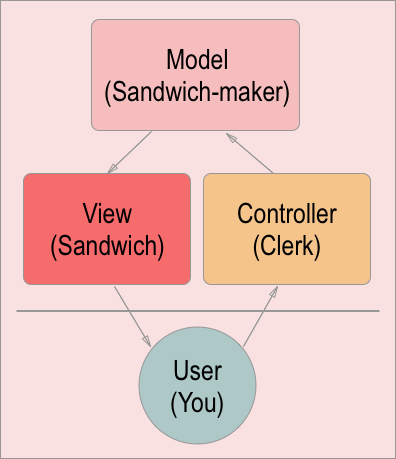
Source and Fun Approach to Explain MVC: freeCodeCamp
What is MVVM?
MVVM (Model-View-ViewModel) Pattern
Overview
MVVM is a design pattern used in software development to structure the architecture of an application, particularly in the context of graphical user interfaces (GUIs). It promotes separation of concerns, making the codebase more modular and maintainable.
Components
- Model:
- Represents the data and business logic of the application.
- Responsible for retrieving, processing, and storing data.
- View:
- Represents the user interface (UI) components.
- Displays information from the ViewModel to the user.
- Passes user input back to the ViewModel.
- ViewModel:
- Acts as an intermediary between the Model and the View.
- Transforms raw data from the Model into a form that the View can display.
- Handles user input from the View and updates the Model accordingly.
Data Flow
- Model to ViewModel:
- The Model notifies the ViewModel of changes in the data.
- ViewModel updates its state based on the changes in the Model.
- ViewModel to View:
- The ViewModel exposes properties and commands that the View binds to.
- The View updates automatically when the ViewModel’s state changes.
- View to ViewModel:
- User interactions in the View (button clicks, text input, etc.) are captured.
- The ViewModel processes these interactions and updates the Model if necessary.
Benefits
- Separation of Concerns:
- Each component (Model, View, ViewModel) has a distinct responsibility.
- Changes to one component have minimal impact on the others.
- Testability:
- ViewModel logic can be unit tested independently of the UI.
- Model and View can also be tested in isolation.
- Maintainability:
- Code is organized and modular, making it easier to understand and maintain.
- Promotes code reusability.
Example Usage
Consider an application displaying a list of items. The Model would handle fetching and managing the data, the View would present the list, and the ViewModel would format the data for the View and handle user interactions.
| Model | ViewModel | View |
|---|---|---|
| Fetches data, Processes data | Formats data for the View, updates | Displays information, Handles user input |
What is SQL?
- SQL stands for Structured Query Language.
- It is a domain-specific language used in programming and designed for managing data held in a relational database management system (RDBMS).
- It is used for querying and modifying data in a database.
- It is the standard language for relational database management systems.
- It is used to perform tasks such as update data on a database, or retrieve data from a database.
What is a Database?
- A database is an organized collection of data.
- It is a collection of information that is organized so that it can be easily accessed, managed, and updated.
- It is a collection of data stored in a computer system.
- It is a collection of data that is organized so that its contents can easily be accessed, managed, and updated.
What is Join & Types of Join?
- A join is a clause that combines rows from two or more tables, views, or materialized views.
- It retrieves data from multiple tables.
- It is used to combine rows from two or more tables, based on a related column between them.
Types of Join
- Inner Join:
- Returns records that have matching values in both tables.
- It is the most common type of join.
- It returns rows when there is at least one match in both tables.
- Left Join:
- Returns all records from the left table, and the matched records from the right table.
- Right Join:
- Returns all records from the right table, and the matched records from the left table.
- Full Outer Join:
- Returns all records when there is a match in either left or right table.
What is a Primary Key?
- A primary key is a column or a set of columns that uniquely identifies each row in a table.
What is a Foreign Key?
- A foreign key is a column or a set of columns that refers to a primary key in another table.
- It is used to establish and enforce a link between the data in two tables.
- In other words, it is used to link two tables together.
What is a Stored Procedure?
A stored procedure is a precompiled collection of one or more SQL statements or procedural logic, which is stored in a database. It can be called and executed within the database environment, typically with parameters passed to it. Stored procedures are often used for encapsulating a set of operations or queries to be executed on the database server.

Stored Procedure vs. Function vs. Trigger
Stored Procedure:
Type: Stored procedures are of procedural type. Return Type: May or may not return a value. Usage: Can be called explicitly by applications or other stored procedures. Modification of Data: Can modify data and perform transactions. Scope: Can have input and output parameters.
CREATE PROCEDURE GetCustomer
AS
SELECT * FROM Customers;
Function:
Type: Functions are of functional type. Return Type: Must return a value. Usage: Can be used in SQL statements like SELECT, WHERE, etc. Modification of Data: Generally, should not modify data. Designed for computation and returning values. Scope: Can have input parameters, but no output parameters.
CREATE FUNCTION GetTotalOrders (@customerId INT)
RETURNS INT
AS
BEGIN
    DECLARE @totalOrders INT;
    SELECT @totalOrders = COUNT(*) FROM Orders WHERE CustomerID = @customerId;
    RETURN @totalOrders;
END;
Trigger:
Type: Triggers are of event-driven type. Return Type: N/A (Triggers don’t return values like functions or procedures). Usage: Automatically executed (triggered) in response to specified events (e.g., INSERT, UPDATE, DELETE). Modification of Data: Can modify data based on the triggering event. Scope: Typically used for enforcing business rules or auditing changes.
-- Creating the "Employees" table
CREATE TABLE Employees (
    EmployeeID INT PRIMARY KEY,
    FirstName VARCHAR(50),
    LastName VARCHAR(50),
    LastModified DATETIME
);

-- Creating the trigger
CREATE TRIGGER OnEmployeeUpdate
ON Employees
AFTER UPDATE
AS
BEGIN
    UPDATE Employees
    SET LastModified = GETDATE()
    FROM Employees
    INNER JOIN INSERTED ON Employees.EmployeeID = INSERTED.EmployeeID;
END;
What is Design Pattern?
Design Pattern
A design pattern is a general, reusable solution to a commonly occurring problem within a given context in software design. It is a description or template for solving a particular design problem that can be adapted and applied to different situations. Design patterns are not finished designs that can be transformed directly into code; they are templates or guides for solving particular problems in a flexible and efficient way.
The use of design patterns helps to streamline the development process by providing tested, proven development paradigms. These patterns can speed up the development process by providing tested, proven development paradigms. Effective software design requires considering issues that may not become visible until later in the implementation. Reusing design patterns helps to prevent subtle issues that can cause major problems and improves code readability for developers who are familiar with the patterns.
Common Design Patterns
- Singleton Pattern:
- Ensures a class has only one instance and provides a global point to that instance.
- Factory Method Pattern:
- Defines an interface for creating an object but leaves the choice of its type to the subclasses, creating the object without specifying its class.
- Observer Pattern:
- Defines a one-to-many dependency between objects so that when one object changes state, all its dependents are notified and updated automatically.
- Strategy Pattern:
- Defines a family of algorithms, encapsulates each algorithm, and makes them interchangeable. Strategy lets the algorithm vary independently from clients that use it.
- Adapter Pattern:
- Allows the interface of an existing class to be used as another interface.
- Decorator Pattern:
- Attaches additional responsibilities to an object dynamically. Decorators provide a flexible alternative to subclassing for extending functionality.
- Command Pattern:
- Encapsulates a request as an object, thereby allowing users to parameterize clients with queues, requests, and operations.
- MVC (Model-View-Controller) Pattern:
- Separates an application into three interconnected components: the Model, the View, and the Controller.
Design patterns are documented solutions to recurring problems. They can speed up the development process by providing tested, proven development paradigms. However, they are not blueprints or templates that can be directly translated into code. Developers need to adapt them to the specific needs of their project.
What is a Framework?
- A framework is a collection of libraries that provide a set of reusable functions and features.
- ex. .NET Framework, .NET Core, ASP.NET Core, Entity Framework Core, Spring Framework, etc.
What is a Library?
- A library is a collection of classes and methods that can be reused.
What is a Package?
- A package is a collection of related classes and interfaces that provide a set of reusable functions and features.
- ex. NuGet packages, npm packages, Maven packages, etc.
What is Cache?
- Cache is a temporary storage area.
- It stores frequently accessed data in a high-speed storage location.
- It is used to reduce the number of times an original data source must be read.
- It is used to improve the performance of a system.
What is a Cookie?
- A cookie is a small piece of data sent from a website and stored on the user’s computer by the user’s web browser while the user is browsing.
What is a Session?
- A session is a temporary and interactive information interchange between two or more communicating devices, or between a computer and user.
What is API?
API (Application Programming Interface)
API stands for Application Programming Interface. It is a set of rules and protocols that allows one software application to interact with another. APIs define the methods and data formats that applications can use to request and exchange information. APIs play a crucial role in modern software development by enabling different software systems to communicate and work together.
Key Characteristics
- Methods and Endpoints:
- APIs expose specific methods (functions or procedures) that applications can call to perform certain tasks.
- Endpoints represent specific URLs or URIs that correspond to these methods.
- Data Formats:
- APIs define the data format in which information is exchanged. Common formats include JSON (JavaScript Object Notation) and XML (eXtensible Markup Language).
- Authentication and Authorization:
- APIs often require authentication to ensure that only authorized users or applications can access certain functionality or data.
- HTTP Methods:
- APIs commonly use HTTP methods like GET, POST, PUT, and DELETE to perform operations.
- Documentation:
- Good APIs come with documentation that explains how to use the API, including details about available endpoints, request parameters, and response formats.
- Versioning:
- APIs may include versioning to ensure backward compatibility while introducing new features or changes.
Types of APIs
- Web APIs (RESTful APIs):
- Commonly used for web and mobile applications.
- Follow principles of Representational State Transfer (REST).
- Communicate over HTTP.
- Library APIs:
- Provide pre-written functions or routines that developers can use in their applications.
- Examples include standard libraries in programming languages.
- Hardware APIs:
- Allow software to interact with hardware components, such as printer APIs or graphics APIs.
- Operating System APIs:
- Provide functions to interact with the underlying operating system.
- Examples include Windows API and POSIX API.
- Database APIs:
- Allow applications to interact with databases using specific query languages.
- Examples include JDBC (Java Database Connectivity) and ODBC (Open Database Connectivity).
APIs facilitate interoperability between different software systems, enabling them to share data and functionality. They are fundamental to building modern, scalable, and integrated applications.
Process vs. Thread
| Feature | Process | Thread |
|---|---|---|
| Definition | Independent program | Smaller unit within a process |
| Independence | Runs in its own space | Shares resources with other threads |
| Resource Allocation | Own memory, file handles | Shares memory space with process |
| Creation Overhead | More resource-intensive | Less resource-intensive |
| Communication | IPC mechanisms (message passing, shared memory) | Directly through shared data |
| Fault Tolerance | Independent, failure in one doesn’t affect others | Failure in one can affect others |
| Parallelism | Runs in parallel on multi-core systems | Can run in parallel within a process |
What is Lazy Loading?
Lazy loading is a programming and software design pattern where objects, data, or resources are loaded or initialized only when they are actually needed or accessed, rather than loading everything at the beginning. The goal is to improve performance, reduce resource usage, and enhance the user experience by loading and using resources on-demand.
In the context of web development, lazy loading is commonly used for:
-
Images: Loading images only when they are about to be displayed on the user’s screen. This can significantly improve the initial page load time.
-
JavaScript: Delaying the loading of JavaScript files until they are required, reducing the initial page load size.
-
Data: Fetching and loading data from a server only when it is needed, rather than loading all data upfront.
Lazy loading is particularly beneficial in scenarios where not all resources or data are essential for the initial rendering or functionality of a page. By loading items only when they are needed, developers can optimize performance and reduce the amount of data that needs to be loaded initially.
HTML Example:
<!-- Before lazy loading -->
<img src="image.jpg" alt="Image">

<!-- After lazy loading -->
<img src="placeholder.jpg" data-src="image.jpg" alt="Image" loading="lazy">
In this example, the loading="lazy" attribute is used to enable lazy loading for the image. The actual image (image.jpg) will only be loaded when it’s about to enter the user’s viewport, improving the page load performance.
Lazy loading is not limited to web development; it can be applied in various software scenarios to optimize resource usage and improve overall system performance.
DDL (Data Definition Language):
- Purpose:
- DDL is used for defining and managing the structure of the database, including creating, altering, and deleting database objects such as tables, indexes, and constraints.
- Key Commands:
CREATE:Used to create database objects like tables, indexes, views, etc.CREATE TABLE Employees ( EmployeeID INT PRIMARY KEY, FirstName VARCHAR(50), LastName VARCHAR(50) );ALTER:Used to modify the structure of existing database objects.ALTER TABLE Employees ADD COLUMN BirthDate DATE;DROP:Used to delete database objects.DROP TABLE Employees;
- Examples:
- Creating tables, altering their structure, and deleting tables.
DML (Data Manipulation Language):
- Purpose:
- DML is used for manipulating data stored in the database. It involves operations like inserting, updating, deleting, and querying data from database tables.
- Key Commands:
SELECT:Used to retrieve data from one or more tables.SELECT FirstName, LastName FROM Employees WHERE BirthDate > '1990-01-01';INSERT:Used to add new records to a table.INSERT INTO Employees (FirstName, LastName, BirthDate) VALUES ('John', 'Doe', '1995-05-15');UPDATE:Used to modify existing records in a table.UPDATE Employees SET LastName = 'Smith' WHERE EmployeeID = 1;DELETE:Used to remove records from a table.DELETE FROM Employees WHERE BirthDate < '1980-01-01';
- Examples:
- Retrieving specific data with SELECT, inserting new records with INSERT, updating records with UPDATE, and deleting records with DELETE.
DDL vs. DML
- DDL (Data Definition Language):
- Deals with the structure of the database.
- Commands include CREATE, ALTER, DROP.
- Used for defining and managing database objects.
- DML (Data Manipulation Language):
- Deals with the manipulation of data stored in the database.
- Commands include SELECT, INSERT, UPDATE, DELETE.
- Used for querying, inserting, updating, and deleting data in database tables.
SOLID Principles
SOLID is an acronym representing a set of five design principles for writing maintainable and scalable software. These principles were introduced by Robert C. Martin and are widely used in object-oriented programming.
1. Single Responsibility Principle (SRP)
A class should have only one reason to change, meaning that it should only have one job or responsibility.
2. Open/Closed Principle (OCP)
Software entities (classes, modules, functions, etc.) should be open for extension but closed for modification. This encourages the use of interfaces and abstract classes to allow for future enhancements without modifying existing code.
3. Liskov Substitution Principle (LSP)
Subtypes must be substitutable for their base types without altering the correctness of the program. In other words, objects of a superclass should be replaceable with objects of a subclass without affecting the functionality of the program.
4. Interface Segregation Principle (ISP)
A class should not be forced to implement interfaces it does not use. Instead of a large, monolithic interface, clients should not be forced to depend on interfaces they do not use.
5. Dependency Inversion Principle (DIP)
High-level modules should not depend on low-level modules. Both should depend on abstractions. Abstractions should not depend on details; details should depend on abstractions. This principle encourages the use of dependency injection and inversion of control.
What is Inversion of Control (IoC)?
IoC (Inversion of Control) is a design principle in software development and a key concept in the broader architectural pattern known as Dependency Injection (DI). IoC is a style of programming where the control flow is inverted compared to traditional programming. In a nutshell, it refers to the inversion of the control of flow from the developer to a framework or container.
Key Concepts of IoC:
- Dependency Injection (DI):
- One of the primary mechanisms used to implement IoC is Dependency Injection. Instead of a component creating its dependencies, the dependencies are injected into the component from an external source (typically a container).
- Container:
- A container is responsible for managing the lifecycle of objects and handling the injection of dependencies. It acts as a repository for objects, creating and wiring them together.
- Decoupling:
- IoC promotes the decoupling of components. Components are not tightly coupled to their dependencies, making the system more modular, maintainable, and testable.
- Configuration:
- Configuration is often used to specify which concrete implementations of interfaces or classes should be used. This allows for flexibility and easier changes without modifying the application code.
Example (Java with Spring Framework):
Consider a class Car that has a dependency on an interface Engine. In a traditional approach, Car might directly create an instance of Engine. In IoC with Dependency Injection:
// Traditional approach
public class Car {
    private Engine engine;

    public Car() {
        this.engine = new GasEngine(); // Direct instantiation
    }
}

// IoC with Dependency Injection
public class Car {
    private Engine engine;

    // Dependency is injected
    public Car(Engine engine) {
        this.engine = engine;
    }
}
In the IoC example, the Car class is no longer responsible for creating its own Engine instance. Instead, the Engine is injected into the Car class, giving control over the dependency to an external source, typically a container or framework.
IoC promotes more modular, maintainable, and loosely coupled code by allowing external entities to manage the lifecycle and dependencies of components. Popular IoC containers/frameworks include Spring (Java), Dagger (Android), and Guice (Java).
What is Dependency Injection (DI)?
Dependency Injection (DI) is a design pattern and a technique in software development where the dependencies of a component (class or service) are injected into it rather than being created within the component itself. This pattern promotes loose coupling and facilitates the Inversion of Control (IoC) principle.
Key Concepts:
- Dependencies:
- Dependencies are external services, objects, or components that a class relies on to perform its tasks.
- Inversion of Control (IoC):
- DI is often associated with IoC, where the control over the flow of a program is inverted from the application code to an external container or framework.
- Injection Types:
- Constructor Injection: Dependencies are provided through the class constructor.
- Setter Injection: Dependencies are set through setter methods.
- Method Injection: Dependencies are injected through method parameters.
Benefits of Dependency Injection:
- Loose Coupling:
- DI reduces the tight coupling between components, making the system more modular and flexible.
- Testability:
- Components with injected dependencies are easier to test in isolation, as mock or test implementations can be injected.
- Reusability:
- Components become more reusable, as they are not tightly bound to specific implementations of their dependencies.
- Maintainability:
- Changes to the implementation of a dependency do not affect the client classes using the dependency.
Example (Java with Spring Framework):
Consider a class Car that has a dependency on an interface Engine. With Dependency Injection:
// Without Dependency Injection
public class Car {
    private Engine engine;

    public Car() {
        this.engine = new GasEngine(); // Direct instantiation
    }
}

// With Dependency Injection
public class Car {
    private Engine engine;

    // Dependency is injected through the constructor
    public Car(Engine engine) {
        this.engine = engine;
    }
}
In the example, the Car class receives its Engine dependency through the constructor, enabling the flexibility to use different implementations of the Engine interface without modifying the Car class.
Dependency Injection is a powerful technique that contributes to better software design by promoting separation of concerns and facilitating the management of dependencies.
Türkçe
Neden OOP?
- Bakım
- Bakım Maliyeti
- Genişletilebilirlik
- Tekrar Kullanılabilirlik
OOP Prensipleri Nelerdir?
- Soyutlama
- Kapsülleme / Sarmalama / Paketleme / Korumalı Erişim
- Çok Biçimlilik
- Kalıtım
Kaynak: Imaginary Cloud
Sınıf ve Nesne Nedir?
- Sınıf Yapısı:
- Sınıf, nesneye yönelik programlamanın temel yapısıdır.
- Bir sınıf içinde veri ve metotlar bir arada tanımlanır.
- Sınıf, bir şablondur ve bir nesnenin nasıl oluşturulacağını belirtir.
- Nesne:
- Sınıftan türetilen örneklerdir.
- Nesneler, belirli bir sınıfın özelliklerini ve davranışlarını taşıyan somut varlıklardır.
- Sınıfın bir örneğidir ve gerçek dünyadaki nesneleri temsil eder.
- Class ve Nesne Arasındaki Farklar:
- Class soyut bir yapıdır, doğrudan kullanılamaz; nesne somut bir kavramdır.
- Class, bir şablondur; nesne, bu şablona dayalı olarak oluşturulan bir örnektir.
- Attributes (Özellikler):
- Sınıf içinde tanımlanan değişkenler veya özelliklerdir.
- Örneğin, bir “Araba” sınıfında, “renk” ve “model” özellikleri bulunabilir.
- Metotlar (Fonksiyonlar):
- Sınıf içinde tanımlanan işlevlerdir.
- Nesne üzerinde çeşitli eylemleri gerçekleştirmek için kullanılır.
- Örneğin, “Araba” sınıfında “hareket_et” veya “dur” gibi metotlar olabilir.
- Instance (Örnek):
- Bir sınıftan türetilen nesnedir.
- Belirli bir sınıfın özelliklerini ve davranışlarını taşıyan bir somut varlıktır.
- Örneğin, “Araba” sınıfından türetilen bir nesne, belirli bir arabanın temsilidir.
- Özelliklerin Örnekleri:
- “Araba” sınıfında renk, model, hız gibi özellikler bulunabilir.
- “Öğrenci” sınıfında isim, numara, sınıf gibi özellikler bulunabilir.